
Free ICT indicators for NinjaTrader 8
Ten ICT models that draw liquidity, sweeps, MSS, FVGs and entry zones on your chart. This guide explains the core concepts, what each tool does and the limits of this kind of reading.
What ICT is
ICT stands for Inner Circle Trader, a way of reading price popularized through the educational content of Michael Huddleston. It starts from the idea that price moves from one pool of liquidity to another: stop orders build up above obvious highs and below obvious lows, and price often returns to take them before its larger move.
The method relies on time as much as on price: each session has a role, and some time windows matter more to its followers. It is a way of organizing your reading, not a law that governs the market.
The core concepts
- Liquidity. Clusters of stop orders above highs and below lows, especially equal highs and equal lows.
- Sweep. Price runs through a liquidity level and quickly returns, taking those orders.
- Market structure shift (MSS) with displacement. A strong move that breaks the last internal high or low, suggesting a possible short-term change of direction.
- Fair value gap (FVG). A three-candle imbalance that leaves an area traded in one direction only, which traders watch when price returns.
- Order block and breaker. Zones formed by the last candle before a strong move, or by a broken level, used as references on a retest.
- Optimal trade entry (OTE). A retracement zone between 61.8% and 78.6% of a leg.
- Killzones. The most active time windows of the London and New York sessions.
- Power of 3 (AMD). Splitting the day into accumulation, manipulation and distribution.
- SMT divergence. Two correlated markets where one stops confirming the other’s high or low.
The ten indicators in the ICT pack
 Available
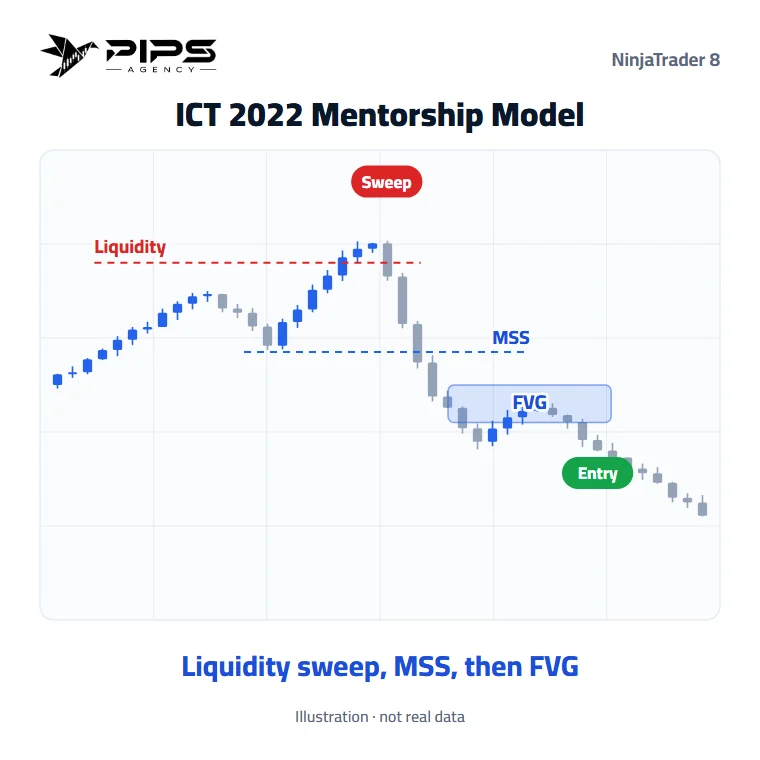
ICT 2022 Mentorship Model
Liquidity sweep, then MSS with displacement, then an entry at the FVG.
Free download → Available
Market Maker Models (MMBM / MMSM)
Reads the market as a curve: stages down to a key level, then a mirrored move back through the same stages, or the reverse in the sell model.
Free download → Available
ICT Silver Bullet
The one-hour window: liquidity taken inside the killzone, then an entry at the FVG.
Free download → Available
Unicorn Model
A breaker block and an FVG overlapping: the confluence zone worth watching.
Free download → Available
ICT Power of 3 (AMD)
Accumulation, manipulation, distribution: the day split into three phases.
Free download → Available
Optimal Trade Entry (OTE)
The 61.8% to 78.6% retracement zone, with an FVG or order block inside it.
Free download → Available
ICT SMT Divergence
Two correlated markets that stop confirming each other.
Free download → Available
Turtle Soup
A break of a prior high, stops taken, then a sharp reversal.
Free download → Available
ICT Killzones & Daily Profiles
New York sessions and killzones, ICT daily profiles and session levels.
Free download → Available
Judas Swing
The false move at the session open, just before the real one.
Free download →Fitting ICT into a trading plan
- Context. Set the higher-timeframe direction and the nearby liquidity: prior day high and low, equal highs and lows.
- Time. Pick one window to trade rather than chasing every session.
- Setup. Wait for the sweep, then the structure shift with displacement, before looking for an entry zone.
- Risk. Define where the idea is invalid before entering, and size the position from there.
- Verification. Test your rules on replayed or simulated data, and log every trade.
To refine your reading at the level itself, you can combine these models with the Order Flow tools.
How to install
- Download the ICT pack (ZIP file) from the free indicators section.
- In NinjaTrader 8, open Tools › Import › NinjaScript Add-On, choose the ZIP file, then restart NinjaTrader.
- Activate your free license: Control Center › New › Pips Agency License, then save your key.
- On the chart, open the indicators list (right-click › Indicators) and add “PIPS AGENCY - …”.
Open NinjaTrader Partner link · Disclaimers
Limits and risks
- Subjective reading. ICT definitions vary between traders, and these indicators draw one interpretation with fixed rules.
- A drawing is not a guaranteed signal. A setup can fail however clear it looks, and past results do not indicate future results.
- Hindsight. Patterns look obvious once complete; test them in real time before trusting them.
- Leverage. A small move can mean a large loss. Read the risk disclaimer before trading real money.
Frequently asked questions
Are the ICT indicators free?
Yes. The ICT pack and its license are free, with no subscription. The indicators run inside NinjaTrader 8, third-party software with its own terms; the platform and market data may be paid depending on your use.
Do these indicators place trades?
No. The ICT models draw the setup zones and stages on the chart and can raise alerts, but they send no orders. The decision and the execution stay with you.
Which timeframes and markets do they work on?
They run on any instrument loaded in NinjaTrader 8. Session-based models such as Silver Bullet and Killzones use New York time, so they make most sense on intraday timeframes.
Are these indicators affiliated with ICT?
No. They are independent tools that apply publicly discussed concepts. They are neither affiliated with nor endorsed by the Inner Circle Trader.
Educational content. These indicators are not investment advice and guarantee no result. Futures trading involves a risk of loss that can exceed the initial investment. Terms of use · Disclaimers